
Printable form
Vehicle condition report template, free to print
For garages, body shops, detailers and mobile mechanics. Print it, fill it in with your customer, and both sign. It is not a lease-return or MOT form.
Black and white, for any printer. Detailing, PPF and wrap jobs have their own detailing and PPF pre-inspection form.
What's on the form
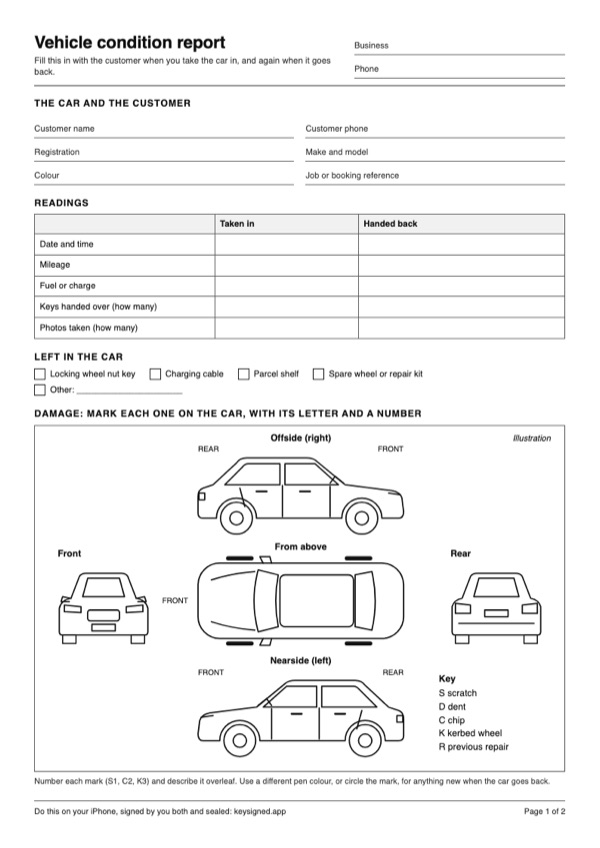
Your business and the customer's details. The registration, make, model and colour. The date, mileage, fuel or charge, keys and photos taken, at both ends of the job. A car outline from above, both sides, the front and the rear, with a key: S scratch, D dent, C chip, K kerbed wheel, R previous repair. Checks for bodywork, wheels and tyres, glass, lights and interior, and both signatures when the car is taken in and handed back.
How to fill it in well
- Start with a clean car, in good, even light.
- Walk round in the same order every time: front, sides, rear.
- Mark each defect with its letter and a number (S1, C2), and describe it on page 2.
- Check the wheels, glass, lights and interior. If there is nothing to note, tick "No visible damage".
- Take photos, and write down how many.
- Read it through with your customer, both sign, and give them a copy.
- When the car goes back, check it against the same sheet, and both sign again.
The same record on your iPhone
KeySigned puts the photos, the marks and both signatures into one record, sealed so any later change shows. Your customer gets the evidence pack, and checks the record with it in an up-to-date browser. Records stay on your iPhone and aren't backed up, so export the ones you need.
Coming soon to the App Store
See a sealed record checkedFrom launch: a two-week free trial for new subscribers, then £14.99 a month or £119.99 a year, VAT included, until you cancel. iPhone with iOS 17 or later.
Pricing
Solo, from launch
£14.99 a month
or £119.99 a year, VAT included. Two-week free trial for new subscribers, then it renews automatically until you cancel. To avoid a charge, cancel at least 24 hours before the trial or a renewal ends: in iPhone Settings, tap your name, then Subscriptions. Covers the Apple Account that subscribes.
Coming soon to the App Store
- Handovers in progress
- Without an active plan, you can still finish, sign and seal a handover within 48 hours of starting it. After that, it needs a plan to sign and seal, and it waits on your iPhone until then.
- Return legs
- The return leg of a car you've already collected is never charged.
- Your records
- Records you've already sealed stay readable, checkable and exportable whatever happens to your plan.
Questions
Is it free?
Yes. Download it and print as many copies as you need. There is no sign-up.
Do we both need to sign?
Yes, when the car is taken in and again when it's handed back. Each signature shows what that person agreed they saw.
Can I do this on my phone?
KeySigned does this on your iPhone. The photos and both signatures go into one sealed record.